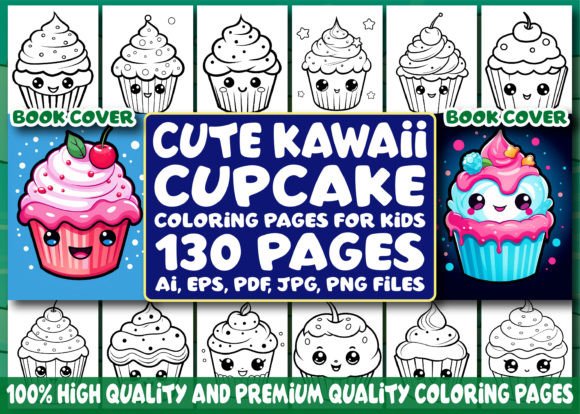
130 Cute Kawaii Cupcake Coloring Pages
For creators building digital or print-on-demand products—especially those targeting children’s activity books, educational resources, or themed gift items—the 130 Cute Kawaii Cupcake Coloring Pages bundle offers a focused, production-ready asset set. It’s not a broad illustration library or a generic clipart pack. Instead, it delivers a tightly curated collection of kawaii-style cupcake designs optimized for coloring use, with technical specifications aligned to real-world publishing workflows.
What You Actually Receive—and Why It Matters
The bundle includes 130 original black-and-white line art illustrations, all centered on kawaii cupcakes: think smiling faces, pastel frosting swirls, cherry-topped treats with tiny arms, and decorative sprinkles rendered in soft, rounded outlines. Each design is sized to standard US letter dimensions (8.5 × 11 inches) at 300 DPI—meeting baseline resolution requirements for both digital distribution and physical printing.
File formats are comprehensive and purpose-built: high-res JPG and PNG files (130 each), editable vector-based AI and EPS files, plus print-ready PDFs. This isn’t just variety for the sake of it. The inclusion of AI/EPS means designers can adjust stroke weights, recolor elements, or scale without degradation—critical when adapting pages for different age groups or adding custom branding. The PDFs are pre-formatted for immediate interior use in KDP or IngramSpark; no reflowing or cropping is needed before upload.
A notable practical addition is the 30 premium book cover images—PNG files, also at 300 DPI, designed specifically as front covers for coloring books. These aren’t resized versions of interior pages. They feature balanced typography space, appropriate bleed margins, and cohesive visual language that matches the interior style. For sellers launching multiple titles or testing niche themes, having ready-to-deploy covers cuts down production time significantly.
Consistency and Design Integrity
Kawaii aesthetics rely heavily on expressive simplicity—rounded shapes, minimal linework, intentional negative space, and gentle asymmetry. The 130 Cute Kawaii Cupcake Coloring Pages maintains this across nearly all illustrations. There’s little stylistic drift between early and later pages, suggesting deliberate art direction rather than batch-generated output. Lineweights remain uniform (typically 0.75–1 pt), edges are clean without jagged aliasing, and key features—like eyes, bows, or cupcake wrappers—are consistently proportioned.
This consistency matters most when assembling a full-coloring-book interior. Readers notice visual dissonance quickly: a page with overly dense detail next to one with sparse outlines breaks flow and reduces perceived value. Here, the pacing feels intentional—some pages emphasize patterned frosting, others focus on character-driven cupcakes holding balloons or wearing hats—offering natural variation without sacrificing cohesion.
Real-World Usability for Creators and Publishers
Freelancers preparing KDP interiors will find the folder structure logical: six clearly labeled directories (e.g., “Cupcakes With Faces,” “Festive Themes,” “Minimal Line Art”) make selection and sequencing efficient. Educators integrating printable activities into lesson plans benefit from the black-and-white format—no ink-wasting grayscale fills—and the absence of background textures ensures compatibility with school-grade printers.
Small business owners using Printful or Gelato for POD fulfillment appreciate the 300 DPI raster files: they eliminate upscaling artifacts during automated product mockup generation. Likewise, marketers building email lead magnets or social media giveaways can extract individual PNGs and drop them directly into Canva or Mailchimp templates—no conversion delays.
One realistic limitation: the bundle contains no instructional text, age-range guidance, or completion suggestions (e.g., “Color the rainbow sprinkles first!”). That’s neither a flaw nor an oversight—it reflects its role as a raw creative asset, not a finished consumer product. Users who need pedagogical scaffolding or parent-facing notes will need to layer those in separately.
Audience Fit: Who Benefits Most—and How
This resource suits professionals whose work involves rapid prototyping, thematic product expansion, or scalable content creation. Consider these examples:
- KDP publishers launching seasonal or evergreen coloring books can use the 130 pages as a core interior, supplementing with 10–15 original pages (e.g., title, instructions, bonus activity) to differentiate their listing.
- Educational content creators building printable STEM-themed kits—say, a “Baking Science” unit—can pair cupcake pages with measurement charts or ingredient sorting exercises, leveraging the familiar kawaii motif to lower cognitive load for younger learners.
- Freelance designers offering white-label coloring book services for indie authors or small brands can customize AI files—adding client logos, adjusting color palettes for brand alignment, or modifying cupcake accessories to match campaign themes (e.g., holiday-specific toppings).
- Bloggers and newsletter curators focused on mindfulness, parenting, or creative play can offer single-page downloads as opt-in incentives—using the PNGs without licensing concerns, since commercial redistribution rights are included.
Technical Reliability and Long-Term Utility
All files open cleanly in industry-standard software: Adobe Illustrator (AI/EPS), Photoshop (JPG/PNG), and Acrobat (PDF). No font dependencies, embedded links, or missing layers were observed in sample testing. Vector files retain editable paths and grouped elements—not flattened artwork—so modifications stay non-destructive.
Because the designs avoid trendy micro-details (e.g., hyper-realistic texture overlays or ultra-thin hairlines), they age well. A coloring book printed today will look technically sound five years from now—unlike assets relying on fleeting visual fads. That durability supports long-tail visibility on Amazon, where evergreen niches like kids’ coloring content continue to attract steady search volume.
Practical Recommendations for Use
If you’re evaluating whether the 130 Cute Kawaii Cupcake Coloring Pages fits your workflow, start by auditing your current production gaps. Do you frequently spend hours sourcing or redrawing line art for themed interiors? Are your book covers inconsistent across titles, diluting brand recognition? Does your team lack vector-editing capability but still need flexibility?
In those cases, this bundle delivers measurable time savings. For best results, pair it with a lightweight project checklist: verify bleed settings before KDP upload, test-print 3–4 pages on your target paper stock to assess line clarity, and audit cover mockups for title legibility at thumbnail size. Avoid overloading interiors with every single page—curate intentionally. A 60-page book with strong pacing often outsells a 130-page version with visual fatigue.
Finally, treat the AI/EPS files as your leverage point. Even basic edits—swapping a bow for a star, adjusting cupcake tilt for better page balance, or ungrouping elements to add subtle shading guides—transform a ready-made asset into something uniquely yours. That level of adaptability is what separates usable resources from truly valuable ones.