250 Cute Unicorn Coloring Pages for Kids
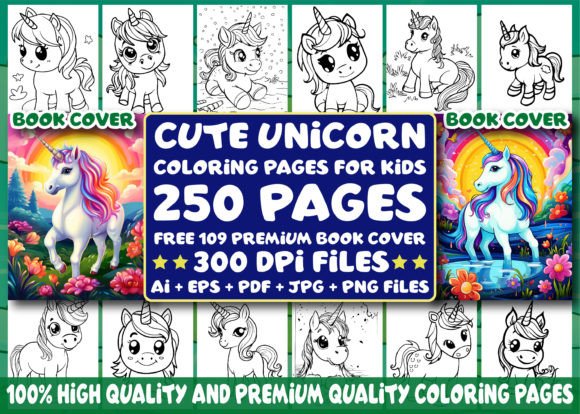
For creators building coloring books on Amazon KDP—or anyone developing print-on-demand (POD) products, educational resources, or digital assets—the 250 Cute Unicorn Coloring Pages for Kids bundle is a production-ready foundation. It’s not just a collection of illustrations; it’s a workflow accelerator designed to reduce time spent on design, increase output consistency, and support scalable publishing across multiple formats and platforms.
Where This Bundle Fits in Your Creative or Business Workflow
This bundle enters your process at the interior layout and asset preparation stage—after you’ve defined your audience, chosen a theme, and confirmed market demand—but before you begin file assembly, cover pairing, or platform upload. It replaces hours of sourcing, editing, or commissioning individual line art. Instead of starting from scratch with vector tools or outsourcing to illustrators, you receive 250 fully finished, high-resolution black-and-white unicorn-themed pages—each optimized for coloring, printing, and commercial use.
That means you can move directly into KDP interior formatting: importing PDFs, verifying bleed and margin settings, applying consistent headers/footers, or embedding page numbers. Because every interior file is provided in A4 (8.5″ × 11″) at 300 DPI, there’s no need for resizing or resolution correction—critical for avoiding KDP rejection or pixelation in printed copies.
How File Formats Align With Real-World Tasks
The inclusion of multiple file types isn’t decorative—it’s functional. Each format serves a distinct purpose in your production pipeline:
- Ai (Adobe Illustrator) files: Let you modify line weight, adjust spacing, add custom text, or reposition elements—ideal when tailoring pages for specific age groups (e.g., simplifying details for ages 3–5 or adding complexity for older kids).
- EPS files: Offer cross-software compatibility if you’re using Affinity Designer, CorelDRAW, or older versions of Illustrator—ensuring editable vector access regardless of your primary design stack.
- PDF files: Are print-ready and standardized. Use these directly for KDP interior uploads without conversion risk or font embedding issues.
- JPG and PNG files: Provide flexibility for social media promotion, blog posts, email newsletters, or preview thumbnails. PNGs—with transparent backgrounds—allow clean overlays on marketing visuals; JPGs load quickly on sales pages.
This multi-format structure eliminates bottlenecks. You don’t need to convert or re-export—just select the right version for each task and proceed.
Integrating Book Covers Into Your Publishing Strategy
The 109 premium book cover images included aren’t generic templates—they’re professionally composed, high-contrast, and styled to match the interior aesthetic. Each is delivered as a 300 DPI PNG with transparent background support, meaning they integrate cleanly into Canva, Adobe Express, or KDP’s cover creator without clipping or quality loss.
Use them to test cover variations before finalizing your listing: swap out title fonts, adjust subtitle placement, or layer promotional badges (“Ages 4–10”, “Instant Download”, “Bonus Activity Pages”) directly over the base image. Because all covers are resizable without degradation, you can generate alternate versions for paperback, hardcover, or even Kindle eBook thumbnails—all from the same source set.
Workflow Examples Across User Types
Educators and homeschoolers use individual pages as standalone activity sheets—printing only what’s needed for a lesson on fantasy themes, fine motor development, or color theory. The A4 sizing fits standard classroom printers, and the 300 DPI ensures crisp lines even after repeated photocopying.
KDP publishers batch-process interiors using automation tools like Book Bolt or Publisher Rocket: import the full PDF set, apply a uniform header, run a spell-check on any embedded text, then export as a single interior PDF. The consistency across 250 pages reduces QA time—no need to verify line thickness or stray pixels page by page.
Freelance designers treat the Ai and EPS files as editable components—not just for coloring books, but for creating themed stationery, greeting cards, or SVG cut files for Cricut/Silhouette users. The unicorn motifs are cohesive enough to build a brand identity around, yet varied enough to avoid visual fatigue across products.
Small business owners running Etsy shops or Shopify stores pair the coloring pages with printable instruction guides, coloring tips PDFs, or parent resource bundles—turning a single digital asset into a tiered product line. The PNGs serve double duty as website banners or Instagram story highlights.
Preparation and Quality Control Checks You Should Run
Before uploading to KDP or distributing externally, complete these quick validations:
- Open one PDF interior file in Adobe Acrobat and check that all pages display correctly at 100% zoom—no cropping or misalignment.
- Verify that black ink is set to 100% K (not rich black) in the PDF properties—this avoids unexpected gray tones during printing.
- Test-print a sample page on your home or office printer using “actual size” scaling—confirm line clarity and contrast.
- Open one Ai file in Illustrator and confirm layers are unlocked and grouped logically—this tells you how easily edits can be made later.
- Check cover PNGs in Photoshop or GIMP: ensure no hidden layers, embedded profiles, or compression artifacts near edges.
These checks take under 10 minutes—and prevent delays caused by KDP warnings, customer complaints about blurry lines, or mismatched cover-to-interior proportions.
Long-Term Usability and Scalability
This bundle supports iterative growth. You’re not locked into one book title or age range. The same 250 pages can become:
- “Cute Unicorn Coloring for Toddlers” (pages 1–60, simplified layouts)
- “Magical Unicorn Adventures: Advanced Coloring for Ages 8+” (pages 120–250, with intricate borders and background scenes)
- “Unicorn ABC & Numbers Coloring Workbook” (using Ai files to insert letters/numbers into existing scenes)
Because the source files remain editable, you retain full control over repurposing, localization (e.g., translating instructions), or seasonal updates (adding holiday elements to select pages). No licensing restrictions limit resale or derivative works—making it viable for both one-off launches and ongoing catalog expansion.
What Makes This More Than Just Another Coloring Pack
It’s the combination of resolution fidelity, format diversity, and intentional design cohesion that sets this bundle apart. Many free or low-cost downloads offer 30–50 pages at inconsistent sizes or 72 DPI—fine for screen viewing, but unsuitable for print. Others deliver only JPGs, locking you out of edits or forcing raster-based workarounds.
Here, every file type serves a documented role in real publishing workflows. There’s no guesswork about which version to use where. And because the unicorn illustrations follow a unified style—soft curves, friendly expressions, balanced negative space—the final book feels professionally curated, not assembled.
If your goal is to ship higher-quality coloring books faster, reduce dependency on external designers, or maintain visual consistency across multiple titles, the 250 Cute Unicorn Coloring Pages for Kids bundle functions less like a download and more like an operational upgrade—one that pays for itself after your second KDP title launch.