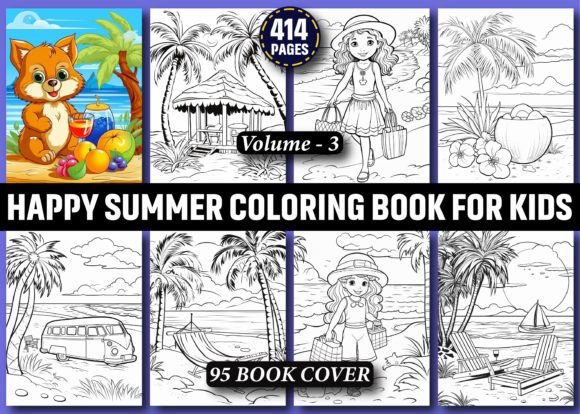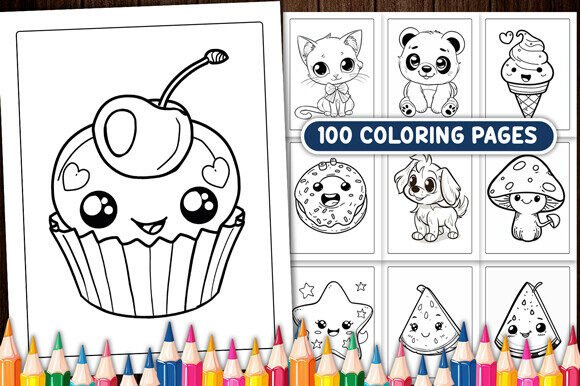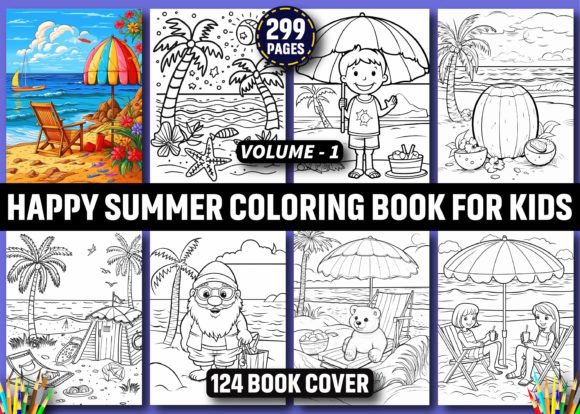
299 Happy Summer Coloring Book for Kids
If you're building a digital product pipeline—whether for Amazon KDP, print-on-demand services, or direct sales—the 299 Happy Summer Coloring Book for Kids functions as a ready-to-deploy interior asset. It’s not a concept or template; it’s a production-ready bundle designed to move quickly from download to marketplace listing. That means less time sourcing, editing, or troubleshooting line art—and more time focusing on positioning, branding, and scaling.
Where This Bundle Fits in Your Publishing Workflow
This isn’t just another collection of summer-themed illustrations. It’s a workflow accelerator. For creators launching multiple coloring books per quarter, the 299 Happy Summer Coloring Book for Kids replaces hours of manual curation or AI generation tuning with a single, high-resolution ZIP. You’re not starting from scratch—you’re stepping into the middle of a proven production sequence: acquire assets → format for KDP → design cover → upload → publish.
Because all 299 pages are delivered in both JPG and PNG formats at 300 DPI and standard 8.5″ × 11″ dimensions (no bleed), they align precisely with Amazon KDP’s interior requirements. No resizing, no cropping, no pixel interpolation. That consistency reduces QA time and avoids common rejection triggers like low resolution or incorrect margins.
Preparation Before Upload: What You’ll Actually Do
You won’t need Adobe Illustrator to use these files—but having access to it helps if you want to refine or repurpose individual elements. Since the designs are AI-generated, minor inconsistencies may appear: faint stray lines, uneven stroke weights, or subtle gaps in closed shapes. These rarely affect coloring usability for ages 3–8, but they matter if you plan to:
- Add layered transparency effects in Canva or Affinity Publisher
- Extract isolated objects for themed activity packs (e.g., “Beach Tools” or “Summer Fruits”)
- Convert selected pages into SVG for web-based interactive coloring tools
- Batch-edit outlines using vector tracing tools for uniform line thickness
For most KDP launches, however, the files work as-is. The key preparation step is organization—not editing. Create a naming convention that reflects page grouping: 001-beach-ball, 047-ice-cream-cone, 182-sun-glasses. This makes it easier to build logical spreads, reorder sequences by theme or difficulty, and maintain version control across multiple book variants.
Integration With Cover Design and Branding
The bundle includes 124 free book cover images in PNG format, also at 300 DPI. These aren’t decorative extras—they’re functional extensions of your interior design language. Use them to test visual cohesion before finalizing your cover. Does the line weight in the cover match what appears inside? Is the summer palette consistent (e.g., warm yellows, sky blues, coral accents)? Do character proportions feel aligned across cover and interior?
That alignment matters because buyers scan thumbnails first. A mismatch between cover energy and interior tone can lower conversion—even if the content is strong. With this bundle, you can treat the cover set and interior pages as one unified visual system rather than two separate assets to reconcile.
Using It Across Platforms—Not Just KDP
While optimized for Amazon KDP interiors, the 299 Happy Summer Coloring Book for Kids scales beyond one channel. Here’s how it integrates elsewhere:
- Print-on-demand services like Printful or Gelato accept JPG/PNG files directly—no PDF conversion needed. Upload batches by theme and automate fulfillment rules based on SKU tags.
- Educational platforms (e.g., Teachers Pay Teachers) benefit from the PNG transparency option. Layer summer scenes over custom backgrounds or embed them in interactive Google Slides activities.
- Subscription boxes or membership sites can split the bundle into weekly releases: “Week 1: Ocean Friends,” “Week 2: Picnic & Play,” etc. The consistent resolution and sizing ensure predictable printing or screen display across devices.
- Social media content gains efficiency too. Pull individual pages into Reels or Pinterest pins—add voiceover prompts (“Can you color the sun yellow and the sand beige?”) without worrying about aspect ratio distortion.
Quality Control in Practice
“AI-generated” doesn’t mean “hands-off.” Treat each file as a draft—not a final—that requires light human review. Spot-check 5–10% of the total pages for:
- Clarity of outlines (no blurred or double-lined edges)
- Proper spacing between elements (especially for younger kids who color outside lines)
- Thematic relevance (e.g., avoid ambiguous silhouettes that could read as multiple objects)
You’ll likely find most pages meet these criteria straight out of the ZIP. When discrepancies occur, they’re usually localized—not systemic. That makes triage efficient: flag, skip, or adjust only what impacts usability or brand standards.
Long-Term Usability and Repurposing
This bundle supports iterative reuse—not one-time deployment. Save the original ZIP intact. Then create derivative folders: /kdp-ready, /tpt-optimized, /svg-extracts. Over time, you’ll build a library where seasonal themes compound value: combine summer pages with your winter or spring bundles to create “All-Year Coloring Collection” volumes without redrawing anything.
Also consider metadata tagging. Add IPTC data to each JPG/PNG noting age range, theme, line thickness category (“bold,” “medium,” “delicate”), and whether it contains text prompts. That pays off when searching across hundreds of assets later—or when licensing subsets to educators or app developers.
Realistic Expectations for Implementation Speed
You can go from download to live KDP listing in under 90 minutes—if your cover is prepped and your publishing account is active. Here’s a realistic breakdown:
- Download & unzip (2 minutes)
- Verify folder structure and file count (3 minutes)
- Select 25–30 pages for first test batch (5 minutes)
- Import into KDP previewer or PDF generator (10 minutes)
- Run through KDP’s auto-check for resolution/margins (5 minutes)
- Upload cover + interior + finalize details (15 minutes)
That’s under an hour for a viable minimum viable product. From there, scale by adding more pages, testing different age-targeted subtitles (“Ages 3–5” vs. “Ages 6–8”), or bundling with companion activity guides.
Final Integration Tip: Match Output to Audience Intent
The 299 Happy Summer Coloring Book for Kids works best when its output matches real usage patterns. Parents don’t buy coloring books for “aesthetic completeness”—they buy them for downtime, travel, screen-free engagement, or fine motor practice. So prioritize pages that support those goals: large simple shapes for preschoolers, layered scenes for early elementary, and recurring characters (like a friendly sun or smiling beach ball) that build recognition across sessions.
When you align technical readiness—high-res files, correct dimensions, clean line work—with behavioral intent—engagement, repetition, accessibility—you turn a digital asset into a reliable tool. And that’s how bundles like this become repeatable leverage points in your creative or entrepreneurial workflow.