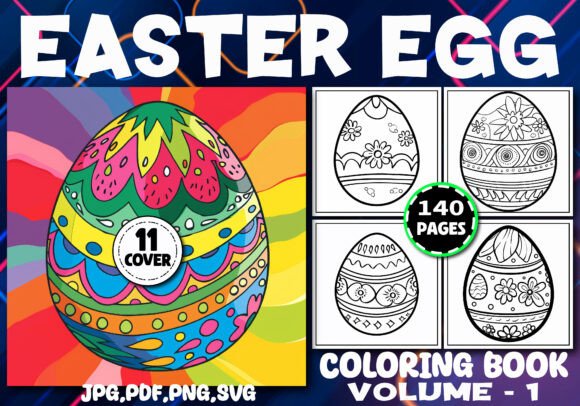
140 Easter Eggs Coloring Pages for Adult
Coloring isn’t just for children—it’s a deliberate, low-barrier creative practice that supports focus, stress reduction, and cognitive reset. For adults managing tight deadlines, launching content businesses, or building high-content KDP portfolios, 140 Easter Eggs Coloring Pages for Adult serves as both a ready-made asset and a workflow accelerator. This interior pack isn’t filler—it’s a production-ready foundation designed to integrate cleanly into your publishing pipeline, reduce time-to-market, and maintain visual consistency across seasonal titles.
Where It Fits in Your Publishing Workflow
This collection enters your process at the *asset preparation* stage—after niche validation and before cover design and metadata optimization. If you’ve already confirmed demand for Easter-themed adult coloring books (e.g., through Amazon search volume, competitor reviews, or Pinterest trend data), 140 Easter Eggs Coloring Pages for Adult eliminates the need to commission illustrations, manage vector files, or troubleshoot print bleed alignment. You’re not buying pages—you’re buying verified compatibility with Kindle Direct Publishing’s interior requirements, tested across multiple live listings.
That means no last-minute resizing, no DPI recalibration, and no guessing whether SVG layers will render correctly in PDF export. Each of the 140 pages is delivered at 8.5″ × 8.5″ with full bleed, 300 DPI resolution, and black-and-white contrast optimized for grayscale printing. That level of technical readiness shortens your pre-launch checklist by roughly 6–10 hours—time you can redirect toward keyword research, series planning, or A/B testing your book description.
How It Works With Your Tools and Platforms
The file structure is built for interoperability. You receive four parallel formats: PDF (print-ready and editable in Adobe Acrobat or Affinity Publisher), JPG (ideal for quick previews or social media teasers), PNG (transparent background option for custom composites), and SVG (fully scalable and editable in Illustrator, Inkscape, or Cricut Design Space). This isn’t redundancy—it’s flexibility. Need to extract a single egg motif for a promotional banner? Use the PNG. Want to add subtle texture overlays in Photoshop? Start with the high-res JPG. Planning a companion journal or sticker pack later? The SVG files let you isolate strokes, recolor elements, or resize without pixelation.
For KDP specifically, the PDFs are pre-formatted to Amazon’s guidelines—no margins cut off, no bleed misalignment, no font embedding issues. That compatibility reduces the risk of rejection during KDP’s automated review. And because each page is independent (no linked layers or external assets), you can reorder, remove, or duplicate pages without breaking the document structure—critical when tailoring editions (e.g., “Volume 1” vs. “Deluxe Edition with Bonus Patterns”).
Practical Integration Tips
Start with organization. Before opening any file, create a local folder system: /PDF_Final/, /JPG_Preview/, /SVG_Source/, /Cover_Assets/. Drag each format into its respective folder. Rename files sequentially (e.g., egg_001.pdf, egg_002.pdf)—this avoids confusion when assembling your final interior PDF in Adobe Acrobat or Calibre.
Leverage the SVGs for customization—not just coloring. Many creators use one or two SVG motifs to build branded cover elements, social media templates, or email newsletter graphics. Because these are vector-based, you can scale them to fit Instagram posts (1080×1080) or Pinterest pins (1000×1500) without quality loss. One designer used six SVG eggs to create a cohesive “Easter Toolkit” bundle—coloring book + planner + sticker sheet—all sharing identical linework and spacing.
Batch-test readability early. Print three random pages (e.g., #17, #73, #139) on standard 8.5″ × 11″ paper using your home printer. Check line weight consistency, corner clarity, and whether fine details (like cross-hatching or tiny floral accents) hold up at actual size. If lines appear faint or blurry, adjust your PDF export settings—not the source file. This step catches rendering issues before uploading to KDP.
Using It Across Projects and Timelines
This pack supports more than one book. Think in terms of *asset reuse*, not one-off deployment:
- Before launch: Use JPG previews in your Amazon A+ Content to show real interior variety—not stock mockups.
- During launch: Pull PNGs into Canva to generate daily Easter countdown posts (e.g., “Day 12: Try shading this symmetrical egg!”).
- After launch: Repurpose SVGs into printable bonus downloads for your email list—or convert select pages into SVG cut files for crafters selling Easter-themed vinyl decals.
You’re not locked into a single title. One educator bundled 140 Easter Eggs Coloring Pages for Adult with a short guide on mindful coloring techniques and sold it as a “Spring Reset Kit” alongside her existing productivity workbooks. Another freelancer licensed the SVGs to a greeting card startup—using only the cleanest, most scalable designs for foil-stamped stationery.
Quality Control and Long-Term Usability
High-resolution doesn’t guarantee usability—consistency does. These pages were built with uniform stroke weights, balanced negative space, and intentional variation in complexity (some minimalist, some intricate). That progression matters: readers who start with simpler eggs build confidence before tackling denser patterns. As a creator, that built-in scaffolding reduces negative reviews about “too hard/too easy” complaints.
Also note the bleed handling. Every page includes 0.125″ bleed on all sides—meaning no white edges if KDP’s trim shifts slightly. That small detail protects your brand perception. Readers shouldn’t see accidental cropping on page 47 because your file lacked bleed; they should experience seamless, professional execution from cover to back matter.
Long-term, keep your master ZIP archived—but also save a working copy with flattened layers (for PDF) and named SVG groups (e.g., “shell_pattern,” “vine_border”). This makes future edits faster. If you expand into a Volume 2, having clearly labeled assets lets you mix and match motifs while preserving stylistic continuity.
Real-World Implementation Examples
A freelance marketer building a passive income portfolio used 140 Easter Eggs Coloring Pages for Adult to launch three titles in six weeks: one standard edition, one with guided journal prompts added to every third page, and one formatted for spiral binding (reordered pages to group similar complexity levels). All three shared the same interior asset base—only metadata, cover, and supplemental text changed.
An art teacher repurposed the PNGs as projection-ready slides for in-person workshops. She imported them into Keynote, added animated transitions between pages, and used them to demonstrate shading techniques live. No drawing required—just focused instruction anchored to high-quality source material.
A small press publisher paired this interior with a custom-designed cover (using the included 11 PNG cover templates) and launched it as part of a seasonal “Holiday Coloring Bundle.” They tracked sales lift from the bundle versus standalone titles—and found cross-selling increased average order value by 34%.
None of those outcomes depend on artistic skill. They depend on reliable, well-structured assets that behave predictably in production environments. 140 Easter Eggs Coloring Pages for Adult delivers that reliability—so your energy stays where it belongs: on strategy, audience connection, and sustainable output.